


Page 28 - CyberSecurityEssentialsEnglish
P. 28
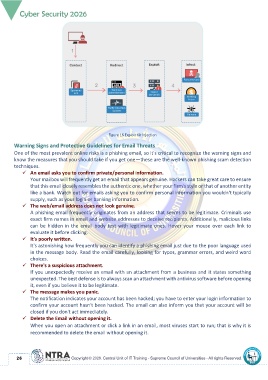
Figure 16 Exploit Kit Injection

       Warning Signs and Protective Guidelines for Email Threats
       One of the most prevalent online risks is a phishing email, so it's critical to recognize the warning signs and
       know the measures that you should take if you get one—these are the well-known phishing scam detection
       techniques.
           ✓  An email asks you to confirm private/personal information.
               Your mailbox will frequently get an email that appears genuine. Hackers can take great care to ensure
               that this email closely resembles the authentic one, whether your firm's style or that of another entity
               like a bank. Watch out for emails asking you to confirm personal information you wouldn't typically
               supply, such as your login or banking information.
           ✓  The web/email address does not look genuine.
               A phishing email frequently originates from an address that seems to be legitimate. Criminals use
               exact firm names in email and website addresses to deceive recipients. Additionally, malicious links
               can  be hidden  in the  email  body text  with  legitimate  ones.  Hover  your  mouse  over  each  link to
               evaluate it before clicking.
           ✓  It's poorly written.
               It's astonishing how frequently you can identify a phishing email just due to the poor language used
               in the message body. Read the email carefully, looking for typos, grammar errors, and weird word
               choices.
           ✓  There's a suspicious attachment.
               If you unexpectedly receive an email with an attachment from a business and it states something
               unexpected. The best defense is to always scan an attachment with antivirus software before opening
               it, even if you believe it to be legitimate.
           ✓  The message makes you panic.
               The notification indicates your account has been hacked; you have to enter your login information to
               confirm your account hasn't been hacked. The email can also inform you that your account will be
               closed if you don't act immediately.
           ✓  Delete the Email without opening it.
               When you open an attachment or click a link in an email, most viruses start to run; that is why it is
               recommended to delete the email without opening it.


          26

